Choose the Home Security Camera WardenCam APK for your device
File verification, APK for arm64-v8aSignature matches the developer’s certificate
Unmodified file: same certificate as this app’s versions from the official app store, signed by LoveInvention Studio (Hongbin Li). A signature shows who signed the file, not how the app behaves.
App permissions
Asks first: 4, Granted automatically: 11
File verification, APK for armeabi-v7aSignature matches the developer’s certificate
Unmodified file: same certificate as this app’s versions from the official app store, signed by LoveInvention Studio (Hongbin Li). A signature shows who signed the file, not how the app behaves.
App permissions
Asks first: 4, Granted automatically: 11
File verification, APK for x86Signature matches the developer’s certificate
Unmodified file: same certificate as this app’s versions from the official app store, signed by LoveInvention Studio (Hongbin Li). A signature shows who signed the file, not how the app behaves.
App permissions
Asks first: 4, Granted automatically: 11
Hi, There you can download APK file "WardenCam" for Android free, apk file version is 2.8.27 to download to your android device just click this button. It's easy and warranty. We provide only original apk files. If any of materials on this site violates your rights, report us
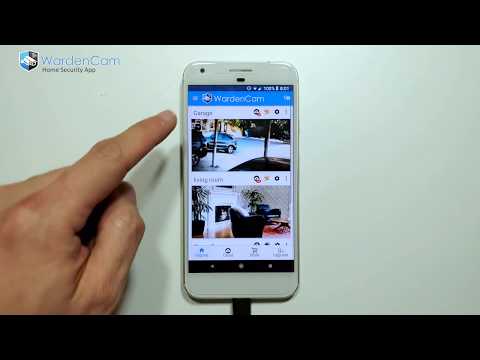
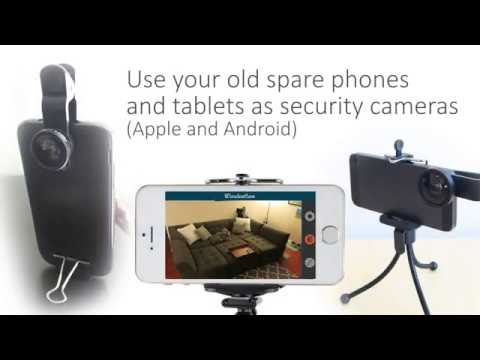
WardenCam turns your spare smartphones and tablets into home security cameras that you can watch while you are away. You can view live streaming, and past events through motion captured recordings. WardenCam can help you find out if your package arrived, help check on your loved ones health and safety, or find out what your pets are up to.
Getting Started: Install the Free WardenCam App on your phone and your spare android devices. In the App, set your spare device to "Camera" mode, sign in with your Google Account, and place your device where you want to watch. In your phone's WardenCam App, set it to "Viewer" Mode, sign in with the same Google Account, and that’s it! Please Log in with the same Google account, that's how the 2 devices can find each other. You are now connected to your loved ones. With WardenCam's motion detection feature and Google Drive and Dropbox integration, you can enjoy peace of mind without keeping a constant eye on things.
FEATURES
- Works anywhere with WiFi, 3G, 4G, and LTE
- Motion detection & alerts (push notification and email)
- Free cloud storage (directly to your Google Drive or Dropbox)
- Replay recordings, to see what you missed
- Setup multiple cameras all in one system
- Live streaming all day and night
- Talk and listen from the viewer console to any of the cameras
VIDEO MONITORING 24/7: Install WardenCam on your spare devices and pocket phone. Sign in with any gmail account as "camera" & "viewer". Place the spare device anywhere of interest at home, in the kitchen, the garage, your office. Monitor live on the pocket phone anywhere with internet.
MOTION DETECTION: Enjoy peace of mind without keeping a constant eye on things. WardenCam provides automated motion detection schedule. Once a motion is detected, it starts siren alarm to scare the intruder away. Link your Google Drive and Dropbox on both the camera and viewer so that WardenCam can also upload the motion video to your cloud storage. You may even enable 24/7 recording to cloud. Simple and secure!
CLOUD STORAGE: All videos are stored directly to your personal cloud storage in Google Drive or Dropbox. You can sign up for free and use GBs of Free Cloud Storage with Wardencam. We never analyze and store your data on our WardenCam servers.
RECEIVE ALERT: Receive a push notification immediately when an intruder is detected, or your elderly relatives are moving about their day. Play back event recordings from the cloud storage.
TWO-WAY AUDIO: Talk while watching the live streaming. Send voice to the camera device. Prevent a negative action before it ever happens
Upgrade:
If you like to use the app for 24/7 video monitoring, please upgrade to premium version with one single payment of USD 5.99. No monthly fee! Visit our website wardencam360.com for more details.
Follow us on facebook to get more user tips from developer!
https://www.facebook.com/WardenCam360
Explore the version history of Home Security Camera WardenCam for Android and see how the app has evolved over time. This section tracks versions added to the apk.cafe catalog, including download size, declared permissions, and Android compatibility. Select a time period or a point on a chart to explore historical version data.
1 new Home Security Camera WardenCam version was added to the apk.cafe catalog in 2026. The catalog contains 29 versions dating back to June 2017.
The Home Security Camera WardenCam download size for most phones increased from 31.57 MB in version 2.2.10 (2017) to 32.9 MB in version 2.8.27, a 4% increase. 1 of 29 versions in the catalog is APKS (split APK), starting with version 2.7.12 (March 2021).
Home Security Camera WardenCam 2.8.27 declares 15 permissions, 1 fewer than version 2.2.10 from 2017 (16).
Home Security Camera WardenCam 2.8.27 requires Android 4.4 or newer and is built for Android 12; version 2.2.10 from 2017 ran on Android 4.1 or newer.
Older versions of Home Security Camera WardenCam. The apk.cafe catalog has 29 versions of Home Security Camera WardenCam, from 2.2.10 (Jun 2017) to Home Security Camera WardenCam 2.8.27 (Oct 5, 2026). If the latest version has a bug, changed something you rely on or does not work on your phone, you can install an earlier one from the list of older Home Security Camera WardenCam APK versions below.
Version 2.8.27 needs Android 4.4 or newer. On older phones: Android 4.1 runs up to version 2.8.14 (May 2022).
Android does not install an older version over a newer one, so uninstall Home Security Camera WardenCam first. This usually deletes the app's data on the phone, so back up anything you need.
Dates show when each version was added to the apk.cafe catalog. Size is the full download for most phones (APK and split parts); permissions are for the same build.
A permission shows what the app can access, not that it uses it.
No special hardware required.
Changes since 2.8.14.
Added in this version